
Information for Faculty
Faculty Guide For Using RegisterBlast
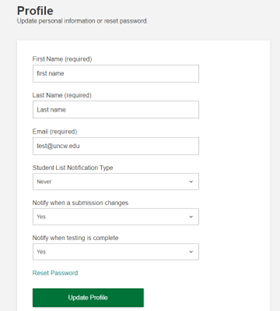
Faculty can set how often they receive an email notification. Options include never, only on exam days, every weekday, every day, weekly, and monthly. Click on the Profile tab in the upper right corner to edit this setting.
Students can schedule an exam AFTER you complete the submission request and add the student to the exam. Once the request is completed students will receive an email instructing them to schedule by using the link in Canvas, provided you have enabled RegisterBlast. This link will take them directly into the scheduling questionnaire for RegisterBlast.
If your students are not sure of the process, you can provide them our Canvas Course page link to follow step-by-step instructions
FAQs for Faculty
Students are required to book their appointments at least 96 hours (4 business days) in advance, before the exam date. The reason some of your students received the “all times are full” message, is because they missed the deadline.
If any of your students tell you they were not able to book a seat and the deadline has not passed, please ask them to contact the CTC (CTC@uncw.edu).
Students will need to provide the following information:
- Course abbreviation and section number
- Professor’s name
- Date and time requested for your exam appointment.
If any of your students tell you they were not able to book a seat, and the deadline has passed, it is both you and the student's responsibility to reschedule.
When completing a submission request in RegisterBlast you will be prompted to submit your exam. If your exam is not ready at that time you can use any of the options below to submit an exam at a minimum of 48 hours prior to the selected exam.
- Uploading to the Professor portal in RegisterBlast is one way to submit.
- You also have the option to email the exams to the CTC (CTC@uncw.edu)
- You may drop off materials in person at the CTC offices, located in DePaolo Hall
Suite 1021.
Please reach out to us as soon as possible at CTC@uncw.edu.